OneNote alternative for everyday work
OneNote is a big digital notebook. If you mainly want to jot things down quickly and keep an eye on tasks, you often look for something lighter. JP Note sits at the edge of your screen and appears with one key.
- ✓ Free
- ✓ No account
- ✓ Windows · Mac · Linux
- ✓ Pro €9.99 once
In short
- Notepad and to-do list right at the edge of your screen
- Alt+N brings it up in a second, without switching apps
- Tasks with dates, reminders and repeats
JP Note fits you if
- you want to jot something down next to your work
- tasks and notes belong together
- you prefer a lean tool over a big notebook
Loose notes turn into one list
This is what many desktops look like. Press the button and watch JP Note turn it into one list with dates.
OneNote and JP Note in everyday work
OneNote organizes content in notebooks, sections and pages and works well for large collections. In everyday work, though, you often need a notepad next to your work: write something down, tick it off, move on.
This is what JP Note is for. Every page has a to-do list on top and room for free text below. Separate notes keep areas like work, private and studies apart.
Type a task the way you would say it
JP Note picks up the date, time and repeat and shows them before saving. Try one of the examples or type your own.
Simplified preview. The app understands more, for example “by 31 Oct” or “every 2 weeks”.
What JP Note does differently
0 of 5 ticked off- Always at handThe dock sits at the edge of your screen, Alt+N shows and hides it.
- Tasks built inDue date, reminder, priority, subtasks and repeat.
- End-to-end encryptedYour notes are encrypted with your password before they leave your device.
- No subscriptionFree to use, Pro is a one-time €9.99.
- Offline firstEverything works without internet and syncs later.
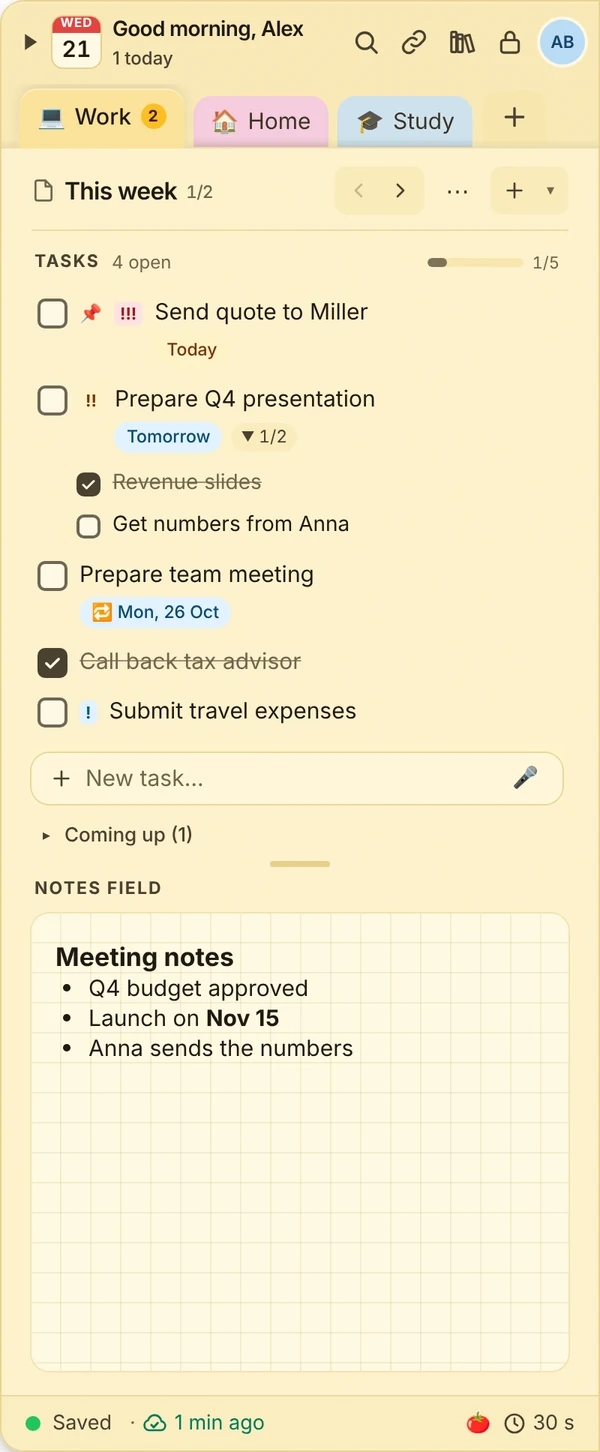
What this looks like day to day
- Meeting notes written below this week’s tasks
- Three tasks from the meeting added with dates
- Focus timer started for the quote
- Week agenda shows what is due tomorrow

Frequently asked questions
Can I bring over notes from OneNote?
The easiest way is to copy the content of a page and paste it into JP Note. Headings, lists and checklists are kept.
Is JP Note available for Mac and Linux?
Yes. JP Note runs on Windows, macOS, Linux and ChromeOS, and with Pro as a phone app too.
Do I need a Microsoft account?
No. JP Note works without an account. You only need a JP Note account to sync between devices (Pro).
How much does JP Note cost?
The free version is free forever. Pro costs €9.99 once, no subscription, and can be tried for 7 days.
Related
Microsoft OneNote: trademarks of their respective owners. JP Note is not affiliated with them. Information about other apps to the best of our knowledge, as of October 2026.